Python3 Tornado in Windows
How to fix the NoImplementedError in asyncio.py

I am a developer from the Greater Boston area, I have a M.S. in Computer Science and Engineering from the University of Connecticut, focused on Bayesian Networks and Bayesian Knowledge Bases. I have experience working on 3D laser scanners, motion platforms, DARPA projects, 3D simulations using the Unity game engine for robotics in synthetic environments (game generated and scanned), mobile development in both Android and iOS.
My strengths are in rapid prototyping and taking an idea into a release candidate. The process is a winding road that takes a lot of time
This all starts with the best intentions… you install python 3, the tornado libraries follow, and finally once you complete your first tornado web application and test it you get the following:
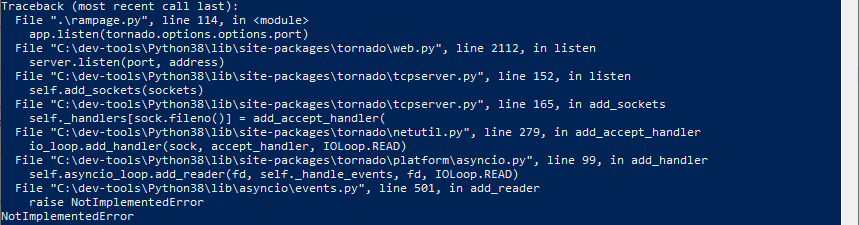
Well then to fix this issue you need to do the following:
import concurrent.futures
import functools

from threading import get_ident
from tornado.gen import convert_yielded
from tornado.ioloop import IOLoop, _Selectable

import asyncio

# Start of fix for Windows
import sys

if sys.platform == 'win32':
    asyncio.set_event_loop_policy(asyncio.WindowsSelectorEventLoopPolicy())
# End of fix

import typing
from typing import Any, TypeVar, Awaitable, Callable, Union, Optional

if typing.TYPE_CHECKING:
    from typing import Set, Dict, Tuple  # noqa: F401

_T = TypeVar("_T")
Seems like the later version of tornado, in windows only, have a missing implementation error on the event loop policy. So you need to add the win32 if statement and import the sys library to your asyncio.py file located in the following folder: \Python38\Lib\site-packages\tornado\platform
Now you should be set ;-)